
Core Web Vitals Explained: A Guide to Google's Ranking Factors
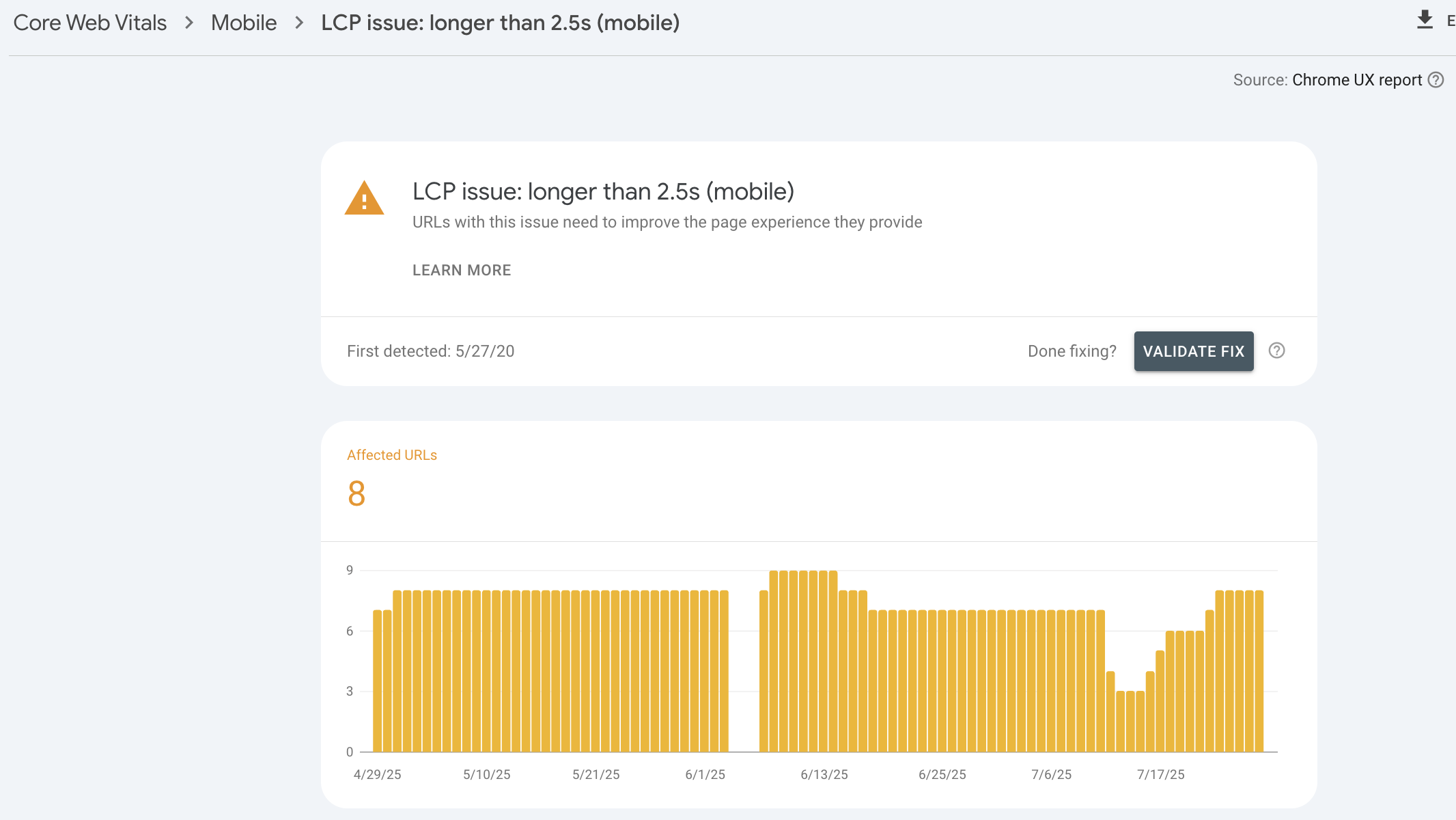
In 2021, Google fundamentally changed how websites compete for search rankings by introducing Core Web Vitals as official ranking factors. This shift marked a pivotal moment in search engine optimization, transforming user experience from a nice-to-have feature into a measurable, quantifiable requirement for search success.
Core Web Vitals represent Google's attempt to standardize user experience measurement across the web. Rather than relying on subjective assessments of what makes a "good" website, these metrics provide concrete, numerical benchmarks that every website can measure and improve against. Looking at Core Web Vitals are an important step in understanding opportunities to increase performance with a Website Speed Audit. Understanding and optimizing for Core Web Vitals has become essential for any business serious about maintaining or improving their search rankings.
The introduction of these metrics reflects Google's broader mission to prioritize user experience in search results. By making page experience a ranking factor, Google incentivizes website owners to create faster, more responsive, and more stable websites—ultimately benefiting users across the entire web ecosystem.
Understanding the Three Core Web Vitals
Largest Contentful Paint (LCP): Loading Performance
Largest Contentful Paint measures how quickly the main content of a page loads. Specifically, it identifies when the largest visible element on the page—whether an image, video, or text block—becomes fully rendered. This metric matters because it represents the moment when users can see and begin consuming the primary content they came for.
According to Google's research, 75% of pages should achieve an LCP of 2.5 seconds or faster to provide a good user experience. Pages that load slower than 4 seconds are considered poor, while those between 2.5 and 4 seconds need improvement.
LCP differs from traditional load time metrics because it focuses on perceived performance rather than technical completion. A page might technically finish loading after 10 seconds, but if the main content appears after 2 seconds, users perceive the page as fast. This user-centric approach makes LCP a more accurate predictor of user satisfaction than older metrics.
Common elements that trigger LCP include hero images, banner graphics, featured videos, and large text blocks. Optimizing these elements requires balancing visual impact with loading speed—a challenge that often requires creative solutions like progressive image loading or optimized video formats.
First Input Delay (FID): Interactivity
First Input Delay measures the time between when a user first interacts with a page and when the browser can respond to that interaction. This metric captures the frustrating experience of clicking a button or tapping a link only to have nothing happen immediately.
Google's performance standards indicate that 75% of page loads should have an FID of less than 100 milliseconds. Delays longer than 300 milliseconds create noticeable user friction, while anything over 100 milliseconds begins to feel sluggish to many users.
FID specifically measures the delay for the first interaction, which is often the most critical for user experience. This first interaction sets user expectations for the entire page experience. A slow initial response suggests that subsequent interactions will also be delayed, leading many users to abandon their intended actions.
JavaScript execution is the primary culprit behind poor FID scores. When browsers are busy parsing and executing JavaScript code, they cannot respond to user inputs. Heavy JavaScript frameworks, large third-party scripts, and inefficient code all contribute to FID delays.
Cumulative Layout Shift (CLS): Visual Stability
Cumulative Layout Shift measures how much visible content shifts during the loading process. This metric addresses the annoying experience of trying to click a button only to have it move at the last second because an image or advertisement loaded above it.
Google recommends that 75% of page loads should maintain a CLS score of less than 0.1. Scores between 0.1 and 0.25 need improvement, while anything above 0.25 is considered poor and likely to frustrate users significantly.
CLS is calculated by multiplying the impact fraction (how much of the viewport is affected) by the distance fraction (how far elements move). This mathematical approach ensures that large movements affecting small areas and small movements affecting large areas are both penalized appropriately.
Layout shifts typically occur when resources load without reserved space. Images without defined dimensions, dynamically injected content, and web fonts can all cause unexpected layout changes that harm user experience and CLS scores.
The Business Impact of Core Web Vitals
The relationship between Core Web Vitals and business performance extends far beyond search rankings. These metrics directly correlate with user behavior patterns that affect revenue, conversion rates, and customer satisfaction.
Research by Vodafone showed that improving their LCP by 31% led to an 8% increase in sales conversions and a 15% improvement in their visitor-to-lead rate. This demonstrates how technical improvements in Core Web Vitals translate directly into measurable business outcomes.
E-commerce websites see particularly dramatic impacts from Core Web Vitals optimization. Studies indicate that improving CLS scores can increase conversion rates by up to 7%, as users are less likely to abandon checkout processes when page elements remain stable during form completion.
The mobile impact is even more pronounced. Google's data shows that sites meeting all three Core Web Vitals thresholds have 24% lower abandonment rates on mobile devices compared to sites that don't meet the standards. Given that mobile traffic now represents the majority of web usage for most businesses, this abandonment rate difference can significantly impact overall business performance.
Core Web Vitals and Search Engine Rankings
While Google has confirmed that Core Web Vitals are ranking factors, their exact influence within the broader ranking algorithm remains somewhat mysterious. However, the evidence suggests that page experience acts as a tiebreaker between otherwise similar content rather than completely overriding content quality and relevance.
The interaction between Core Web Vitals and other ranking factors creates complex optimization scenarios. A page with excellent content but poor Core Web Vitals might still rank well if competitors have similar technical issues. Conversely, a page with mediocre content but exceptional user experience metrics might gain rankings against stronger competitors with technical problems.
Local search results appear particularly sensitive to Core Web Vitals performance. Google's emphasis on user experience becomes more pronounced when users are searching for immediate, location-based solutions. A restaurant with slow-loading menu pages or a service provider with unstable mobile forms may lose local search visibility to technically superior competitors.
The long-term SEO implications extend beyond direct ranking impacts. Websites with poor Core Web Vitals typically have higher bounce rates, shorter session durations, and lower engagement metrics—all signals that Google considers when evaluating content quality and user satisfaction.
Technical Strategies for LCP Optimization
Improving Largest Contentful Paint requires a systematic approach to resource loading and server performance. The goal is to ensure that the most important visual elements appear as quickly as possible while maintaining overall page functionality.
Server response time optimization forms the foundation of LCP improvement. Slow server responses delay everything else on the page, making it impossible to achieve good LCP scores regardless of other optimizations. Upgrading hosting plans, implementing server-side caching, and optimizing database queries can all contribute to faster initial responses.
Resource prioritization becomes critical for LCP optimization. Modern browsers can be instructed to prioritize certain resources over others using techniques like preloading critical assets and deferring non-essential scripts. The rel="preload" attribute tells browsers to fetch important resources immediately, while loading="lazy" defers less critical images until they're needed.
Image optimization represents one of the most impactful LCP improvements for most websites. Converting images to modern formats like WebP or AVIF can reduce file sizes by 25-50% without quality loss. Implementing responsive images ensures that mobile users don't download unnecessarily large files designed for desktop displays.
Content Delivery Networks (CDNs) can dramatically improve LCP scores, particularly for international audiences. By serving content from servers geographically closer to users, CDNs reduce the physical distance that data must travel, directly improving loading times.
Addressing First Input Delay Issues
FID optimization focuses primarily on JavaScript performance and execution efficiency. Since JavaScript blocking is the main cause of input delays, reducing and optimizing JavaScript becomes the primary strategy for FID improvement.
Code splitting allows browsers to load only the JavaScript necessary for initial page functionality, deferring non-critical scripts until after the page becomes interactive. This technique requires careful analysis of which functionality users need immediately versus what can wait for later loading.
Third-party script management often provides the biggest FID improvements with the least development effort. Analytics codes, social media widgets, advertising scripts, and customer service chat tools all contribute to JavaScript execution time. Auditing these scripts and removing unnecessary ones can significantly improve FID scores.
Web Workers offer an advanced solution for computationally intensive JavaScript operations. By moving heavy processing to background threads, Web Workers prevent JavaScript execution from blocking user interactions, maintaining responsiveness even during complex operations.
Browser caching strategies can indirectly improve FID by reducing the amount of JavaScript that needs to be downloaded and parsed on repeat visits. Proper cache headers ensure that browsers store JavaScript files locally, eliminating download time and reducing parsing overhead.
Eliminating Cumulative Layout Shift
CLS optimization requires proactive design and development practices that prevent unexpected layout changes. The key principle is reserving space for content before it loads, ensuring that late-arriving elements don't displace existing content.
Image and video dimension specification has become mandatory for good CLS scores. Every image and video element should include width and height attributes that match the content's aspect ratio. CSS can then scale these elements appropriately while maintaining their reserved space.
Font loading strategies significantly impact CLS scores. Web fonts often cause text to reflow when they finish loading, particularly if fallback fonts have different dimensions. The font-display: swap CSS property and font preloading can minimize these layout shifts.
Dynamic content insertion requires careful handling to avoid CLS penalties. Content management systems, advertising platforms, and social media embeds often inject content without reserving space. Implementing placeholder elements or using CSS transforms instead of layout-changing properties can prevent these shifts.
Animation and transition optimization should avoid properties that trigger layout recalculation. CSS transforms and opacity changes don't cause layout shifts, while modifications to width, height, or position properties do. Understanding which CSS properties trigger reflows helps developers create smooth animations without CLS penalties.
Tools and Measurement Strategies
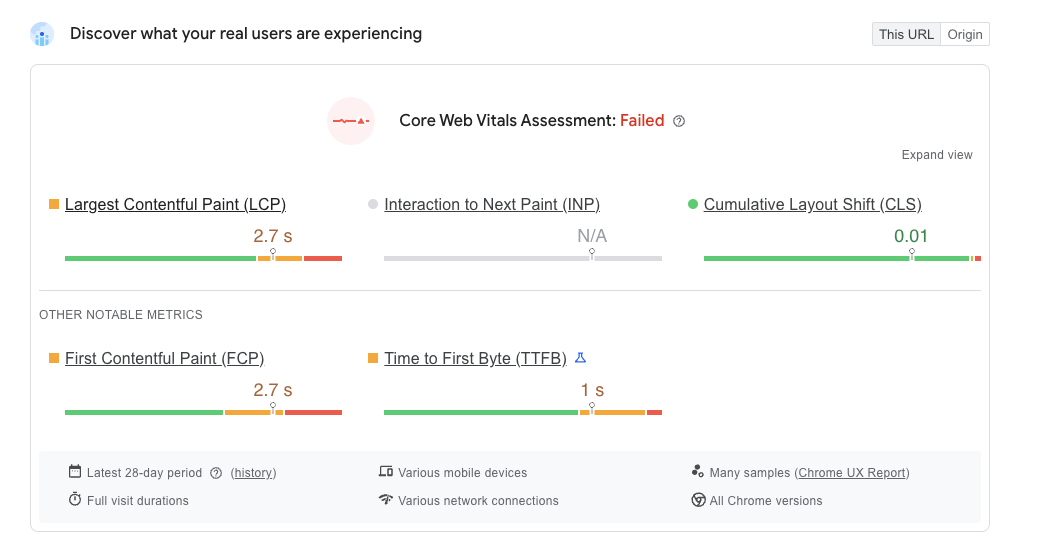
Accurate Core Web Vitals measurement requires understanding the difference between lab data and field data. Lab tools like Google's PageSpeed Insights provide controlled testing environments that help identify specific optimization opportunities, while field data from actual users reflects real-world performance across diverse devices and network conditions.
Google Search Console provides the most authoritative Core Web Vitals data since it reflects exactly what Google sees when evaluating your website. The Core Web Vitals report identifies which pages need improvement and tracks progress over time as optimizations are implemented.
Chrome DevTools offers detailed performance profiling that helps developers understand exactly what's causing Core Web Vitals issues. The Performance tab provides timeline views of page loading, while the Lighthouse audit tool gives specific optimization recommendations.
Real User Monitoring (RUM) tools provide ongoing insights into how actual users experience your website across different devices, locations, and network conditions. This data is particularly valuable for understanding how optimizations perform in practice versus controlled testing environments.
Mobile-Specific Core Web Vitals Considerations
Mobile devices present unique challenges for Core Web Vitals optimization. Limited processing power, variable network connectivity, and smaller screens all influence how these metrics should be approached on mobile platforms.
Network variability affects mobile Core Web Vitals more than desktop performance. While desktop users typically have stable broadband connections, mobile users may experience anything from high-speed 5G to slower 3G networks. Optimization strategies must account for worst-case scenarios while still delivering excellent experiences on faster connections.
Touch interface considerations become important for FID optimization on mobile devices. Mobile users often interact with pages differently than desktop users, frequently tapping multiple elements in quick succession. Ensuring that these rapid interactions feel responsive requires particularly aggressive JavaScript optimization.
Viewport considerations affect how LCP is measured on mobile devices. The "largest" contentful element on a mobile screen might be relatively small compared to desktop versions, but it still needs to load quickly to provide a good user experience.
The Future of Core Web Vitals
Google continues to evolve Core Web Vitals based on user behavior research and technical capabilities. Understanding the direction of these changes helps businesses prepare for future requirements and avoid reactive optimization cycles.
Interaction to Next Paint (INP) has been proposed as a potential replacement or supplement to First Input Delay. While FID only measures the first interaction, INP would evaluate responsiveness throughout the entire page session, providing a more comprehensive view of interactivity performance.
Additional metrics focusing on visual completeness and content usefulness are under consideration. These potential additions would measure how quickly meaningful content appears and becomes usable, extending beyond basic loading and interactivity measurements.
The increasing importance of Core Web Vitals in ranking algorithms suggests that businesses should prioritize performance optimization as a long-term strategy rather than a one-time project. Regular monitoring and continuous improvement will likely become necessary for maintaining competitive search positions.
Implementation Roadmap
Successfully optimizing Core Web Vitals requires a structured approach that prioritizes high-impact improvements while building sustainable performance practices. Beginning with comprehensive measurement establishes baseline performance and identifies the most critical issues.
Quick wins often include image optimization, basic caching implementation, and removal of unused third-party scripts. These improvements can be implemented relatively quickly and often provide significant metric improvements that build momentum for larger optimization projects.
Advanced optimizations like server upgrades, code restructuring, and advanced caching strategies typically require more investment but provide lasting performance improvements. These changes often address fundamental architectural issues that enable sustained good performance rather than temporary improvements.
Ongoing monitoring and maintenance ensure that Core Web Vitals performance doesn't degrade over time. Regular performance audits, automated monitoring alerts, and performance budget enforcement help maintain optimal user experiences as websites grow and evolve.
Core Web Vitals represent more than just another set of technical metrics—they're Google's formalization of user experience as a competitive business factor. Websites that excel in loading speed, interactivity, and visual stability don't just rank better in search results; they provide superior user experiences that drive better business outcomes.
The businesses that treat Core Web Vitals optimization as an ongoing commitment rather than a one-time project will gain sustainable competitive advantages. As Google continues to refine these metrics and potentially introduce new ones, companies with strong performance foundations will adapt more easily to changing requirements.
The investment in Core Web Vitals optimization pays dividends beyond search rankings. Faster, more responsive, and more stable websites create better user experiences that translate into improved conversion rates, increased customer satisfaction, and stronger brand perception.
Ready to transform your website's Core Web Vitals performance and unlock better search rankings? The technical experts at Custom Web Audits specialize in comprehensive Core Web Vitals analysis and optimization. Our detailed audits identify specific performance bottlenecks and provide actionable roadmaps for achieving and maintaining excellent Core Web Vitals scores. Don't let poor user experience metrics hold back your search performance—contact Custom Web Audits today to schedule your comprehensive website audit and start building the fast, responsive website your users and Google expect.
See exactly what's hurting your website
Start free with our instant SEO tools — or run the all-in-one audit: SEO, speed, accessibility, content, AI visibility & conversion, in one report.